

Research Data Management Policy (RDMP)
Introduction
NUS has both rights and responsibilities towards data generated by research at the University, and NUS may be held accountable for the integrity of the data even after the researchers have left NUS.
We thus need to design and adopt a policy on the management of research data, to ensure that valuable data are not lost. Such a policy also provides a basis to answer allegations of research misconduct or questions about the results obtained. It also assists in the protection of intellectual property and assures auditors and industry that robust academic supervision is in place. Correct data handling can also allow limited access to others for certain datasets with appropriate safeguards and permissions.
NUS Research Data Management Policy Ver 3
- The BCH Data Bank is a 3TB network file storage server for research data archival.
- Access to the BCH Data Bank is given to BCH researchers and is for research materials only.
- In Phase 1 pilot trial users are given limited space depending on size of lab for now and applications for usage can be made via the “Getting Access” link on the left
- The BCH Data Bank is accessible once the user has logged into the NUSSTF domain either within NUS network or over VPN (when outside NUS).
- Users are able to maintain private access to their files and directories or may choose to share their files and directories with other users.
Drive Mapping
Easy access to your network directory.
- To map the programme directory, right click on “My Computer” and select “Map Network Drive”
 |
 |
- A dialog will pop up prompting you for the drive letter and the programme directory location.
- Enter your desired drive letter and put the programme directory as “\\bchdb.nus.edu.sg\bchXYZ“, please replace XYZ with your ID.
- Check the “Reconnect at logon” checkbox.
 |
Usage
Secured Access.
- if the computer is not logged into nusstf domain, a windows dialog box will pop up prompting for a password
- enter your user id as “userid” and your password
 |
- your mapped drive or programme folder behaves like any folder on your local computer
- the network drive can be dragged onto the desktop to create a short cut to it
- you can drag and drop or copy and paste files
- you can create directories in them too
 |
Getting Access
Currently BCH Data Bank is under pilot phase 1. We welcome volunteer labs to come and join in the test of this project.
How do I get access to it?
- Please send email to Webmaster for approval.
For PI, please email with details of lab size.For research staff please email with supervisor’s approval.For students (with supervisor’s approval), please email to request for special temporary account to access. - PI are to email us for access revocation when members leave the department.
Directory and File Sharing
- Directories and files are by default accessible to all members of the programme.
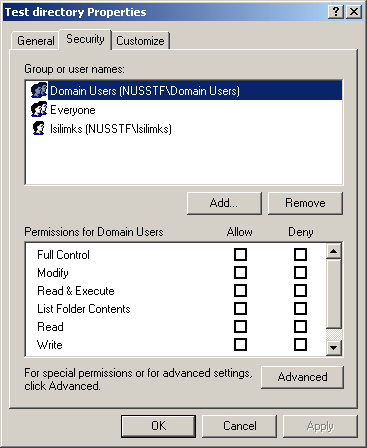
- Select directory/file, right-click on it and select “Properties”.
- You should be able to go to the “Security” tab.
| directory |
 |
| file |
 |
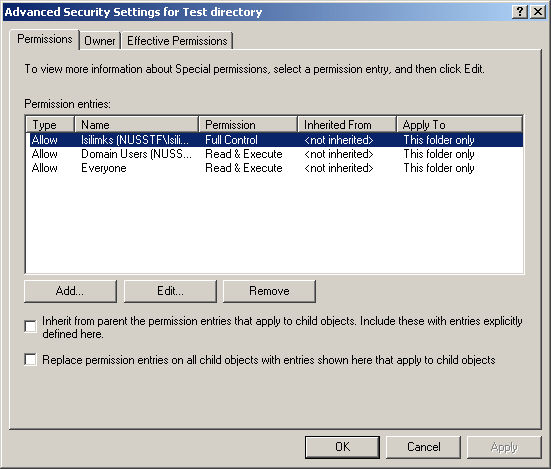
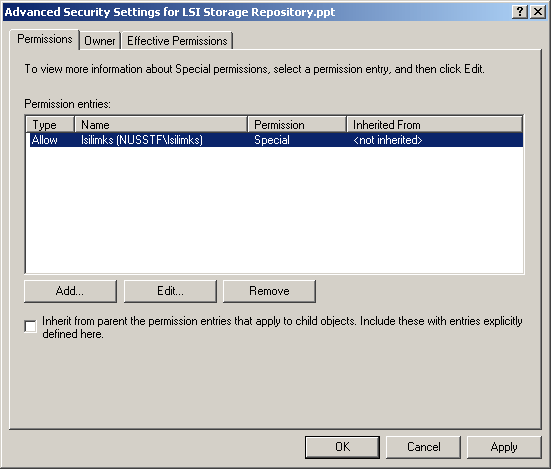
- click on “advanced” button and you should be able to see the following permission summary
| directory |
 |
| file |
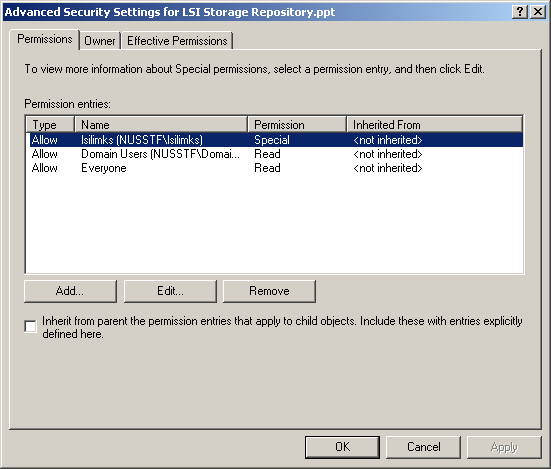 |
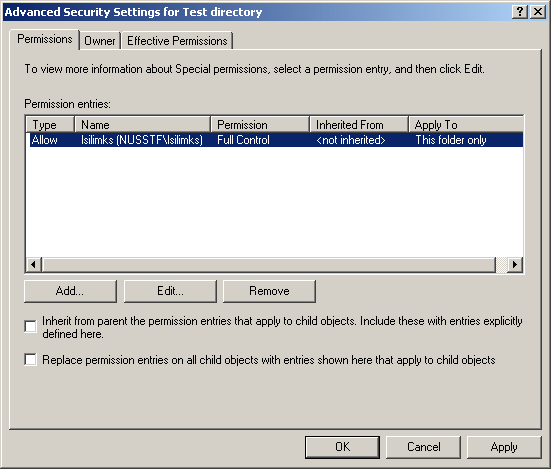
- To disallow programme members from viewing your directory, click on “user (user)” and click on “remove” button.
- Do the same for “everyone” unless there are student access required.
- This applies to both directories and files.
| directory |
 |
| file |
 |
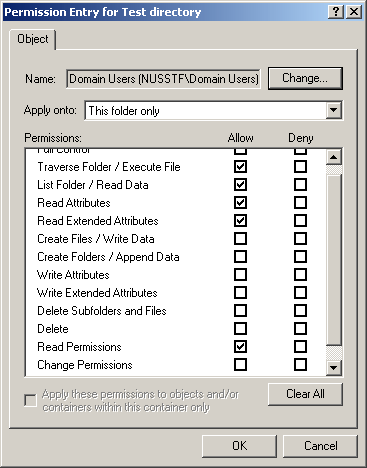
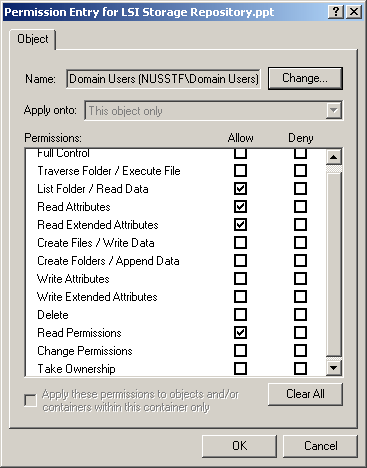
- To allow programme members to view your directory, click on “domain users (nusstf\domain users)” and click on “edit” button.
- Check the following attributes:
| Ddirectory | File | |
| Traverse folder / Execute file | ✔ | |
| List folder / Read data | ✔ | ✔ |
| Read Attributes | ✔ | ✔ |
| Read Extended Attributes | ✔ | ✔ |
| Read Permissions | ✔ | ✔ |
| directory |
 |
| file |
 |
Contact
| PI-in-charge | Co-PI-in-charge | Technician |
|---|---|---|
| A/P Tin Wee TAN tinwee@bic.nus.edu.sg +65 6516 3242 |
Dr Kenneth BAN bchbhkk@nus.edu.sg +65 6516 3246 |
Rahmah bchra@nus.edu.sg +65 6601 2360 |